
Connect - A Smart way to manage Home Appliances
This project is aimed to redesign the experience of controlling home appliances. app, with a focus on user needs and preferences.
My Role
Experience & Interface design
Tools Used
Figma
Timeline
Sep 2022
Overview
001
Problem Statement
Connect is a smartwatch app to control and manage smart home devices with a user-friendly interface and real-time notifications for unusual activity.
Hypothesis
Home residents tend to own multiple smart home appliances and need a way to conveniently manage and control them through a single device that is quick to operate.
Key Goal
Is to design a smartphone app to provide users with an easy and convenient way to control and manage their smart home devices through their wrist. With a user-friendly interface, users can...
-
Easily toggle lights,
-
Adjust temperature, and
-
Monitor security cameras from anywhere within the range of their smart home network.
The app will also provide real-time notifications and alerts for any unusual activity detected by the smart home devices.
Discover Phase
Devices
WatchOS
Android Watches
Critical Success Factors
Reduce cognitive load
Easy connectivity of smart devices with smartwatch
The ability of user to control device remotely
General Tasks
Register devices
View device state
View notifications of power state
Control individual device
User research
002
Research
Findings & insights
Primary
In this research, I conducted a survey to understand user's needs for controlling home appliances via smartwatches, including basic and advanced functions. This included understanding smart home device types, smart watch features, and user preferences while controlling home devices.
Secondary
Studied watch user guides from existing home appliance control IOS watches to validate design ideas and support my primary research.
Survey Results & Finding
Conducted one-on-one interviews with 6 users of smart appliances to understand the most expected features users want to reflect their basic needs and expectations.
Key Finding
-
Out of all the users interviewed, everyone possesses at least one smart home device. Where 4 out of 6 users possess a smartwatch.
-
Their primary reason to buy smart home devices was security, safety and convenience.
-
Users prefer to be in charge of knowing their home devices’ status and control them.
-
Most users are unable to identify the power consumption of their home devices conveniently.
-
Some already existing apps are outdated and difficult to link.
User Persona
003

Justin
31 years old
Justin has been a professional photographer for over a decade, specialising in commercial and portrait photography. He recently opened his own studio in New York City, to have a personal working place. As a busy professional, Justin values efficiency and comfort in his working environment. He recently invested in a range of smart home appliances to ensure that his studio is both comfortable and functional.
Habits
-
Likes to keep up with the latest technology and equipment advancements.
-
Turns off appliances when not in use to save energy.
Frustrations
-
Don’t have time to use each appliance’s system control apps to manage each of his devices.
-
Unable to effortlessly control every smart home device and seems crowded.
Goal
-
To control all of the devices using a single device rather than individual apps for each one.
-
Need a portable and quick-to-use platform which frequently shows notifications of the status of devices.
Photographer & Studio Owner
Prototype
005
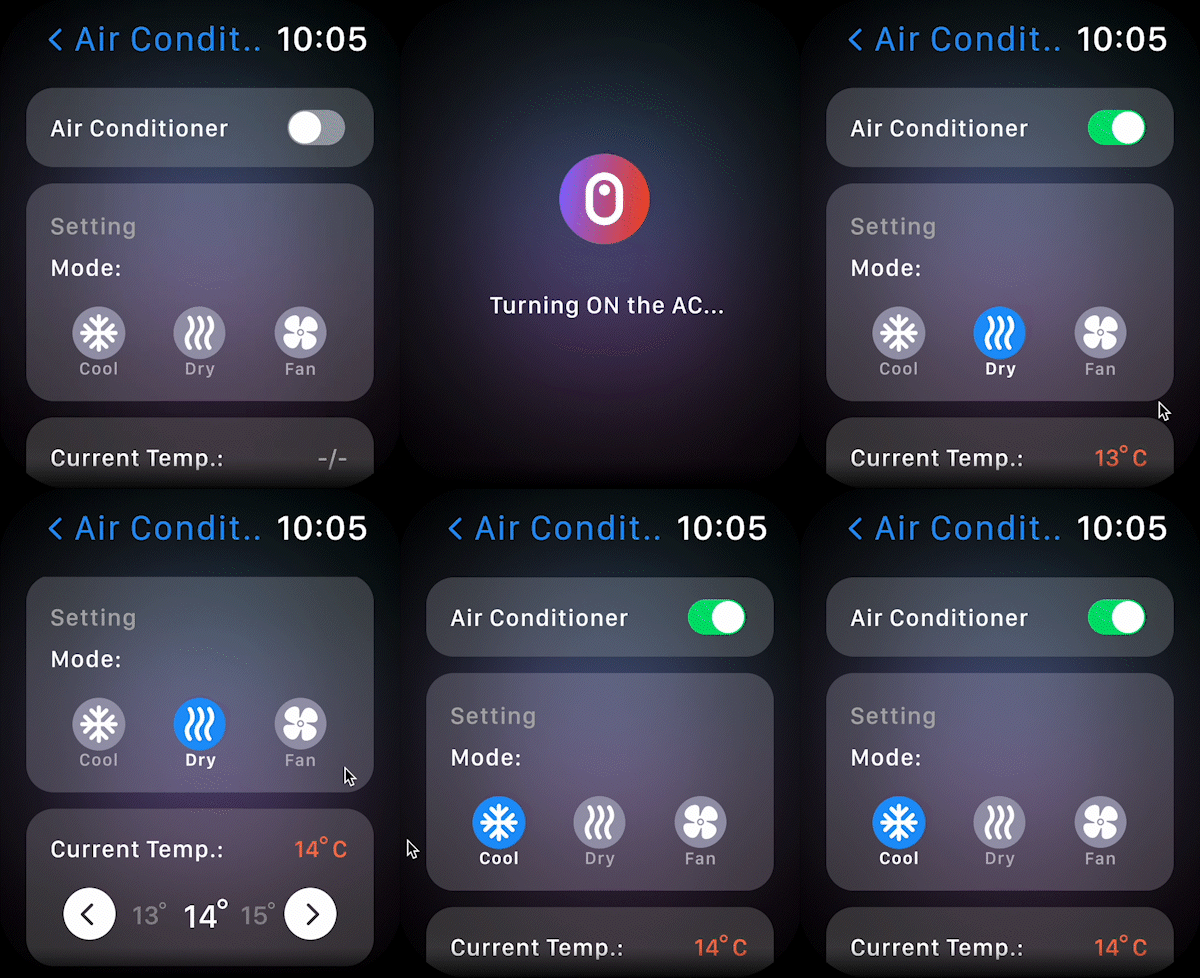
Control
User can manage multiple devices at the same time, and make changes like adjusting the volume to changing device modes and temperature.
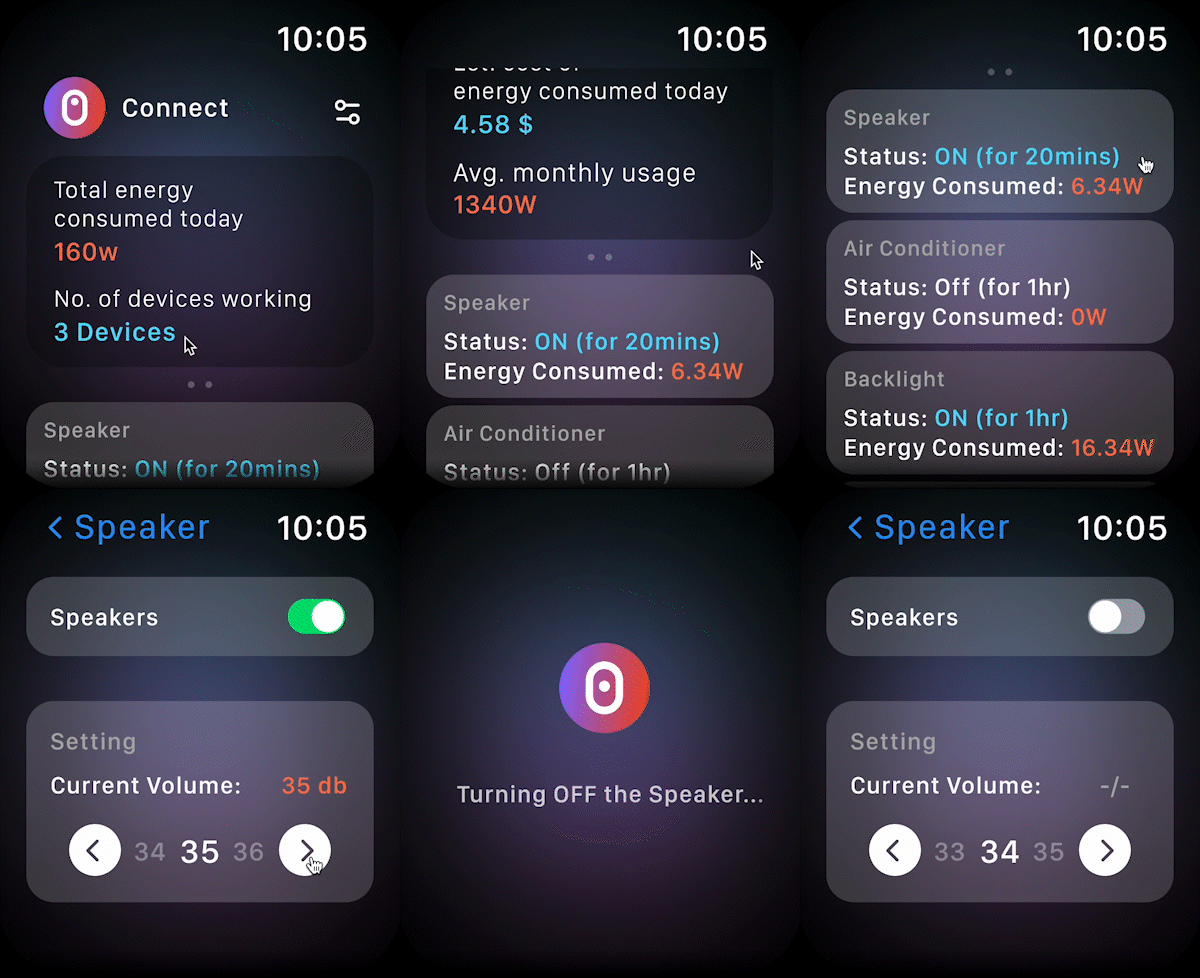
Home Page
Home page provides brief information about energy consumption and charges, giving users clarity about their energy usage. Users can connect a device and toggle changes according to their needs.
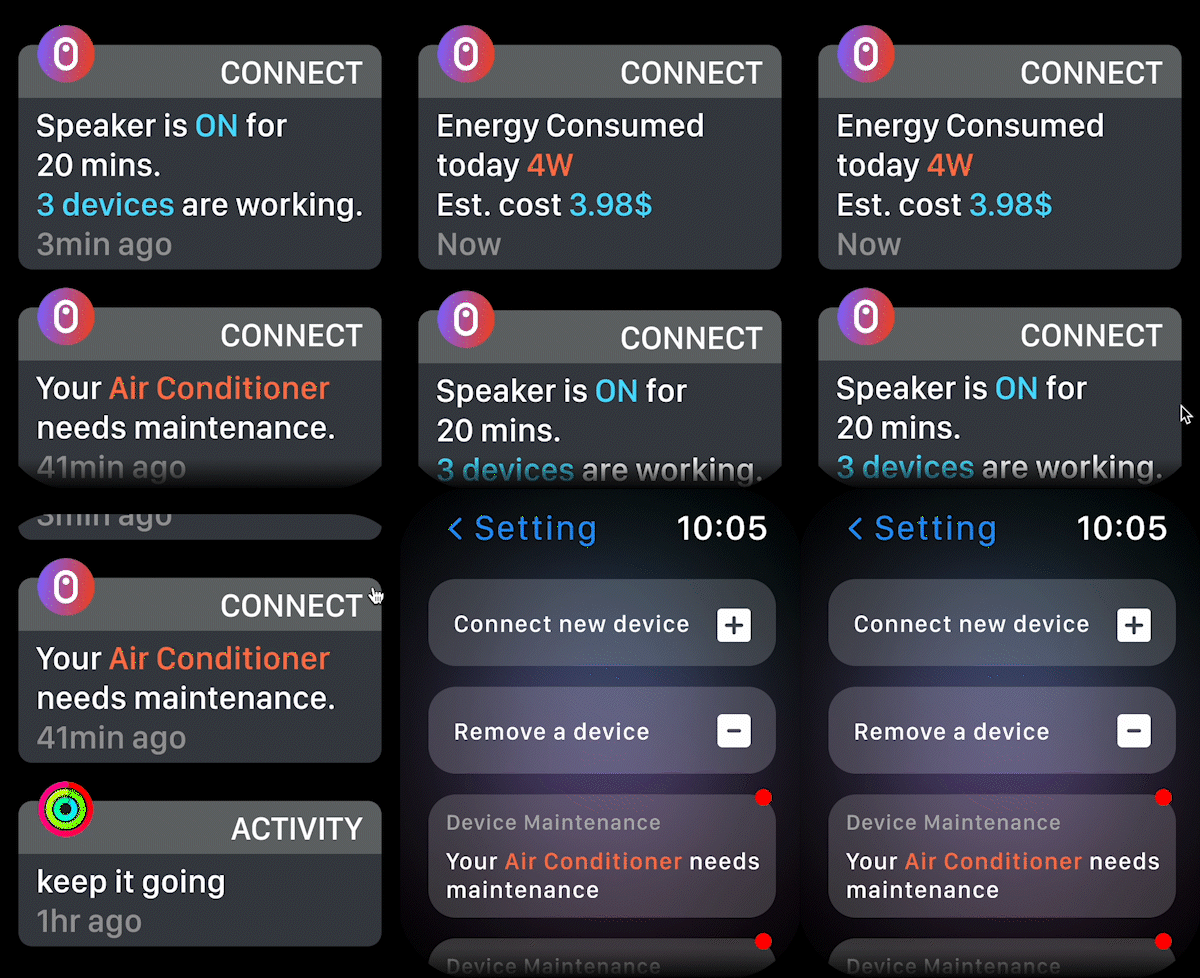
Notification & Settings
Every day’s energy consumption notification will pop up to help users identify their energy consumption. If a device is working for some time the user will receive a notification about time and energy consumed.
Connect will send a reminder in the watch if a device needs maintenance. Setting allow users to monitor the state of all the devices at once. User can add or remove a device in Connect.