
Confluence Private Note -taking feature
My Role
UX UI Designer
Tools Used
Figma, Adobe Photoshop
This project is about creating a note-taking feature within Confluence that allows users to take private notes while browsing pages without disrupting the existing content.
Timeline
Oct 2022 to Dec 2022
Team
Shishir Gangwar, Dev.
Overview
001
Problem Statement
Confluence offers a multitude of features for seamless team collaboration. However, during page browsing, you may wish to take private notes without sharing them with others. Cloning the page and adding comments creates a new version that is out of sync with the original.
Key Goal
-
Develop a note-taking feature that is seamlessly integrated into the Confluence interface.
-
Enable users to take notes without affecting the original page content.
-
Allow users to easily navigate to their notes through Confluence Side Panels.
-
Enable users to share notes with specific people for improved collaboration.
-
Enhance productivity while using Confluence pages.
Solution
The new note-taking feature offers a better solution by keeping your thoughts organised while keeping the original page free from clutter. You can add notes to the page without disrupting the existing content and navigate to them easily through Confluence Side Panels. Sharing notes with specific people allows for improved collaboration.
Target Audience
The note-taking feature will be targeted towards Confluence users who wish to take private notes while browsing pages.
User research
002
Research
Findings & insights
A survey of Confluence users was conducted in order to better understand our users. Using this survey, a baseline list of needs was established before adding a confluence note-taking feature.
Additionally, 17 individuals completed the survey. Here are the findings.
88%
of the respondents work on multiple projects simultaneously and keep a separate notepad with detailed notes to keep their thoughts organised and collaborate with the team.
81%
of the respondents feel having a separate notepad to take notes for each project leads to disorganisation and a lack of clarity. With notes scattered across different apps, it can be challenging to find specific information quickly or keep track of updates.
Persona
003

Mandy
Marketing Associate
-
Mandy is a marketing associate in a media firm. She uses Confluence to collaborate and organize projects and content across relevant teams.
-
This page is a collaborative space for her design and ads teams to create digital assets. (We can show the page filled with comments and replies.)
-
Mandy wants to make some notes for herself; she adds them to a notepad app with a link to this Confluence page. But she eventually loses the precise context of the note, so she also writes it down in her book to help her when she is going to refer back later.
-
Unfortunately for Mandy, comments cant be used to jot down her thoughts as comments are visible to the team on the page.
-
Meanwhile, her colleagues also start reviewing the page and put their thought process through comments. They only need to get things clarified from Mandy, and jot down their immediate thoughts, but comments are the only way to do so.
-
Mandy is frustrated. She has to switch between multiple Apps, her page is becoming more and more cluttered with comments, the phenomenon called as “Jaundiced Page”.

Rick
-
Rick has recently joined Atlassian and is going through the Onboarding.
-
He is already bogged down by the amount of documentations he needs to go through.
-
He stumbles upon a page on AWS training and while following the page, he refers to some external websites and make notes.
-
However, he cannot to put them as a comment to the page because of permission restrictions, or because he doesn’t want his private notes to become available to everyone.
-
It can also make this generic page a lot cluttered if everyone starts putting up their Notes through comments.
Tech team
Empathy Map
004
SAYS
-
“I often take notes while browsing Confluence pages but I don’t want to clutter up the page.”
-
“Cloning the page to add notes creates a mess and it’s hard to keep track of changes.”
-
“It would be great if I could add notes without affecting the original content.”
-
“I want my notes to be easily accessible and organized so that I can find them quickly.”
-
“Sometimes, I need to share my notes with specific people to collaborate on a project.”
THINKS
-
“I wish there was a better way to take notes without creating a new version of the page.”
-
“Adding notes should be easy and intuitive.”
-
“I need to keep my notes separate from the main content to avoid confusion.”
-
“I don’t want to waste time searching for my notes.”
FEELS
-
Frustrated with the current option of cloning the page to add notes.
-
Anxious about the prospect of a new feature that can keep notes organized and accessible.
-
Relived that notes can now be added without creating a new version of the page.”
DOES
-
Explores the new note-taking feature to see how it works.
-
Adds personal notes to the page to test out the feature.
-
Shares notes with specific people to collaborate on a project.
-
Users Confluence Side Panels to easily navigate to and refer to notes.
Feature #1
005
Writing a Note
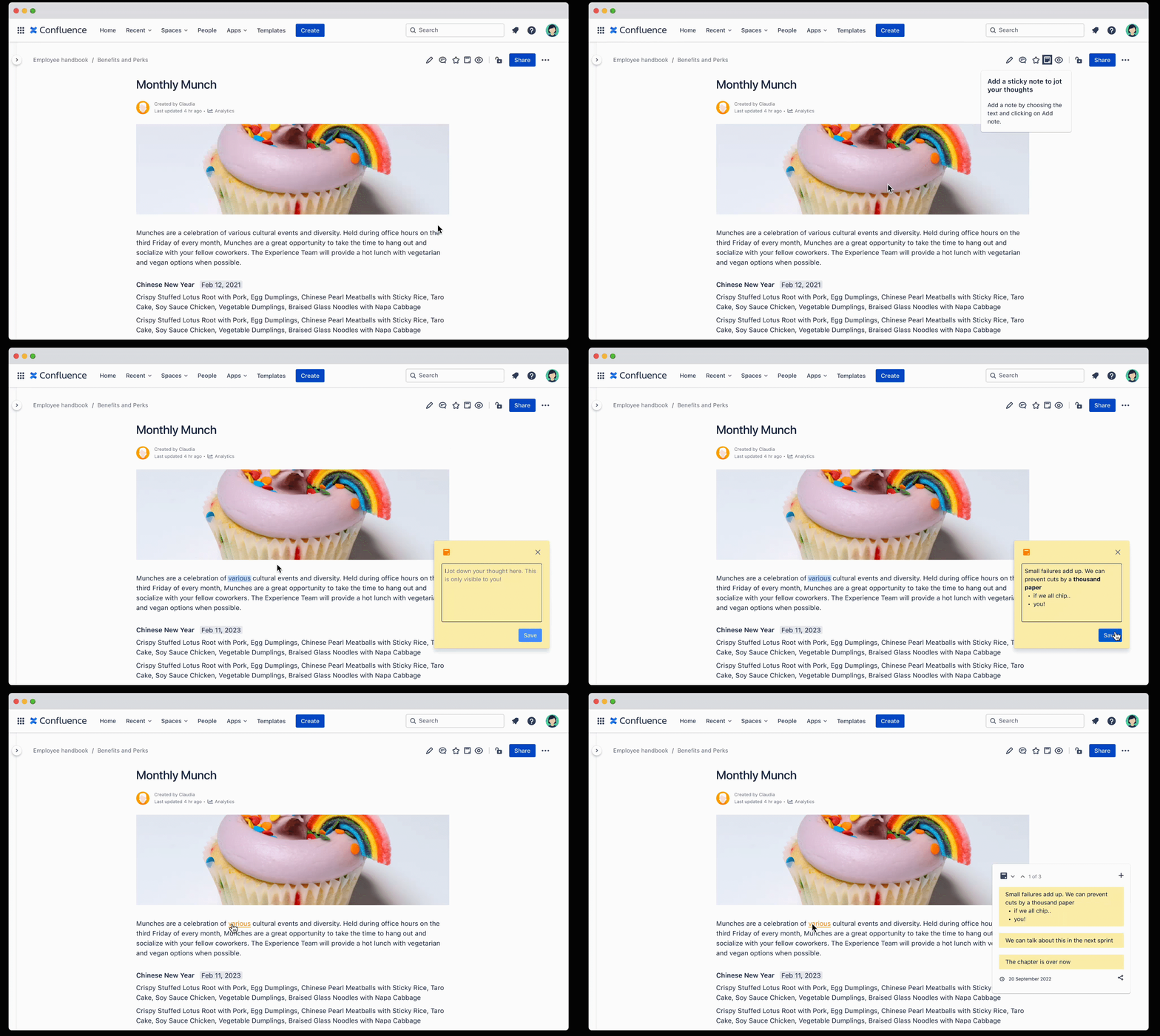
Just like adding a comment on confluence, the note feature will be accessible through a button in the confluence toolbar, and users will be able to create, edit and delete notes within the feature. A default sticky note appears for the user’s guide while hovering over the note icon.
Feature #2
006
Quick access
to Notes
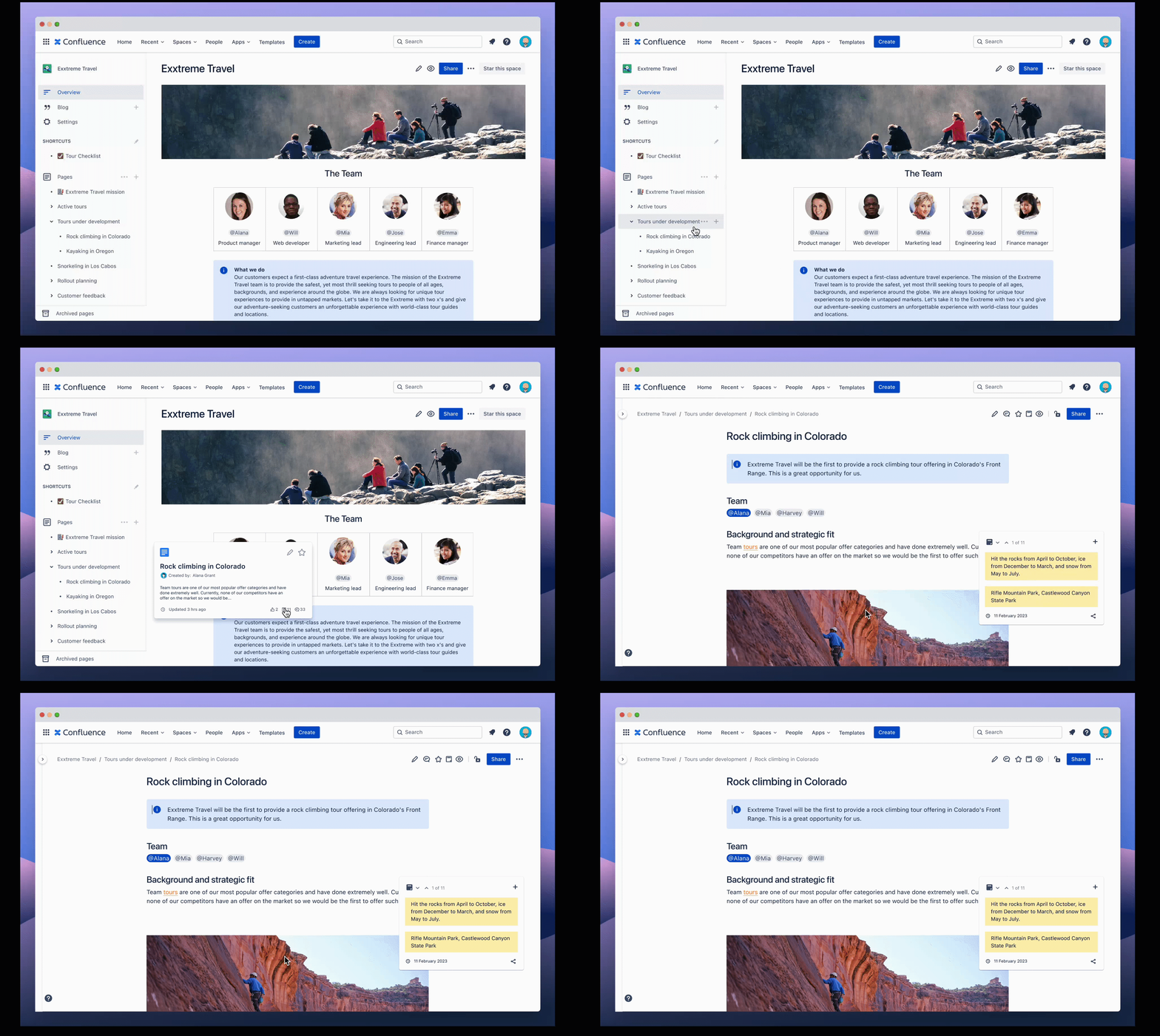
To enhance productivity, Clicking on the note icon in the content information box will take users directly to the note’s location on the original page content.
Feature #3
007
Personal Space
for Notes
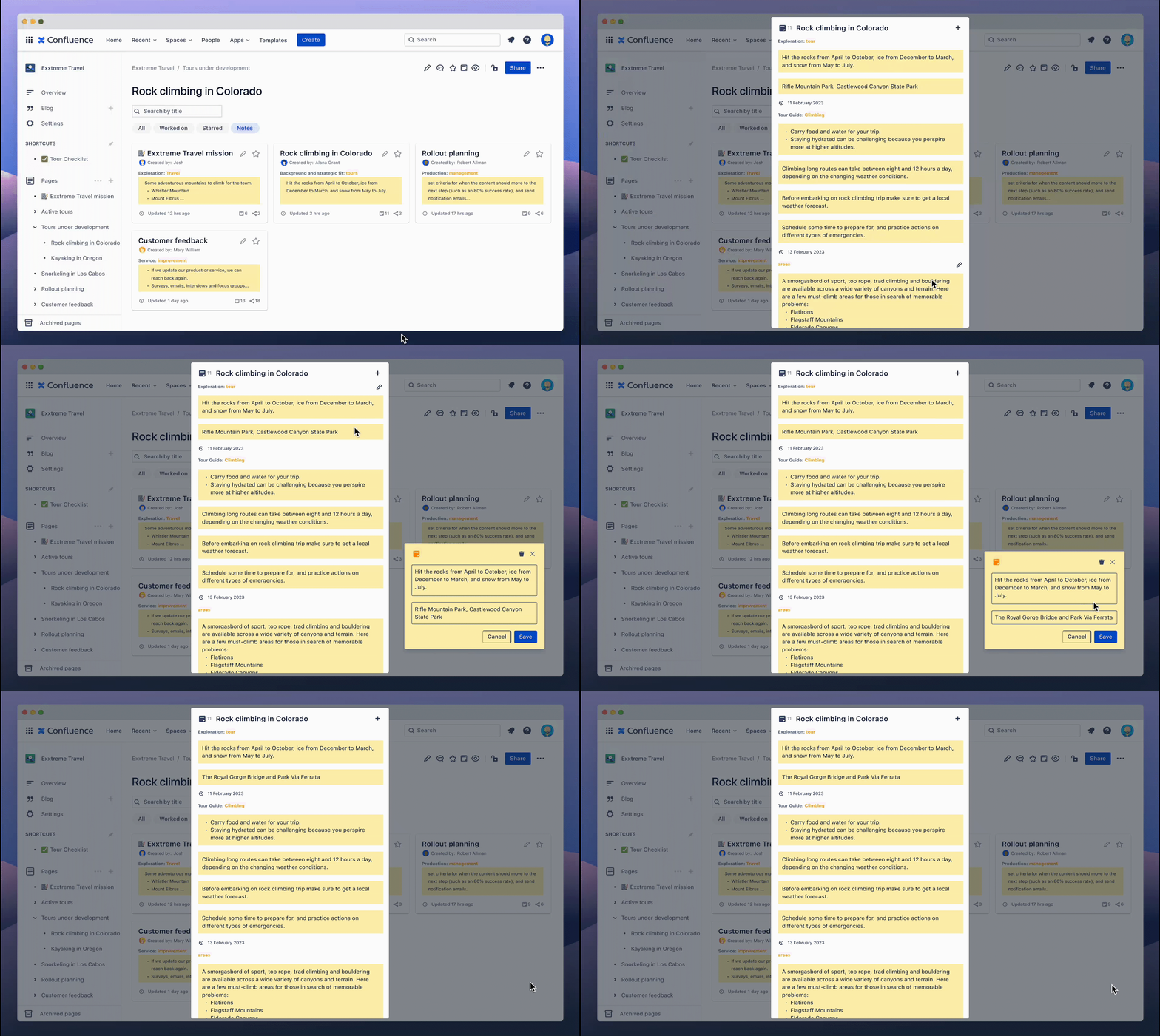
The notes will be stored separately from the original page content allowing users to have a personal space, and giving them a more structured environment to handle their private notes. Users can browse, modify, and share notes with specific people, ensuring improved collaboration between team members.

Feedback
008
The new note-taking feature has been well-received by Confluence users, with positive feedback highlighting the increased productivity and collaboration that the feature provides.
User Testing
& Feedback
"The note-taking feature on Confluence is easy to use. I appreciate the ability to tag notes with specific projects and share them with team members, making collaboration much more streamlined."
"As someone who works on multiple projects simultaneously, the note-taking feature on Confluence is very helpful. I can keep my notes organized and easily collaborate with my team, all in one place."
"The new note-taking feature on Confluence is a game-changer! It's so easy to take private notes without cluttering up the page, and I love being able to access my notes quickly through the side panel."
Conclusion
009
Overall, the high percentage of participants who keep separate notepads for different projects highlights the importance of note-taking in the workplace. By adding a note-taking feature to Confluence, users can improve their organization, collaboration, and productivity while working on multiple projects simultaneously.
This project allowed me to use my skills in user research, UI/UX design, and collaboration to deliver a valuable addition to an already powerful team collaboration platform.
